AI Billing
The AI Billing page provides administrators with a centralized view of AI-related usage and associated costs across elDoc.
It records AI transactions generated by supported platform capabilities, allowing administrators to monitor how AI resources are consumed by users and system processes.
Depending on the operation, usage information can include the number of input tokens, output tokens, the model or processing source involved, and the corresponding calculated cost.
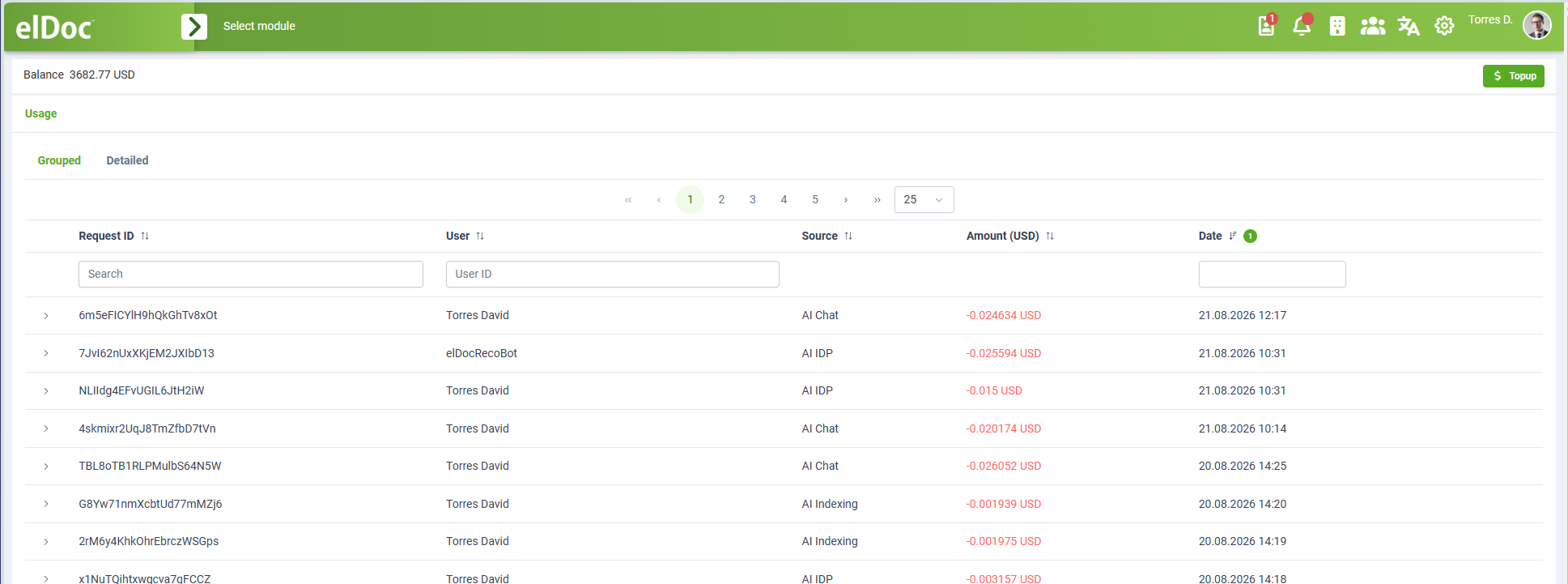
Balance
The top of the page displays the current AI Billing balance.
The balance represents the amount currently available for AI-related processing.
Where applicable, the Topup action can be used to add additional balance.
Insufficient Balance and AI Processing
In per-usage billed environments, elDoc reserves the required amount before starting an AI operation.
When the available balance is too low to create the required reservation, or when the balance reaches or falls below zero, AI processing is stopped until additional funds are added.
This applies to AI-powered operations that require billable model usage, including capabilities such as:
- AI Chat;
- AI Document Processing;
- AI Indexing;
- AI Agents;
- other billable AI/LLM operations.
Once the balance is replenished using Topup, AI processing becomes available again.
This reservation mechanism prevents the system from starting AI operations when sufficient balance is not available to cover the expected usage.
Usage
The Usage section contains the history of AI-related transactions.
Transactions can originate from different elDoc AI capabilities, such as:
AI Chat;
AI Document Processing;
AI Indexing;
AI Agents;
other AI/LLM-powered operations.
Each transaction is associated with the corresponding request and user or system account that initiated the operation.
Grouped View
The Grouped tab provides a summarized view of AI usage.
Each row represents an AI request or logical processing operation.
The grouped view includes information such as:
Request ID
User
Source
Amount (USD)
Date
Request ID
The Request ID uniquely identifies the AI processing request.
It can be used to correlate the grouped transaction with its detailed billing records.
User
The User column identifies the user or system account associated with the AI operation.
AI processing initiated automatically by the system can be associated with a dedicated system account rather than an interactive user.
Source
The Source column identifies the elDoc capability that generated the AI usage.
Examples include:
- AI Chat
- AI Document Processing
AI Indexing
- AI/Cloud OCR
This makes it possible to understand which parts of elDoc are responsible for AI consumption.
Amount
The Amount (USD) column displays the calculated cost associated with the request.
The amount is calculated from the AI usage recorded for the corresponding processing operation.
Date
The Date column shows when the AI request was processed.
Detailed View
The Detailed tab provides transaction-level information for individual AI model calls.
This view is used when more detailed analysis of AI consumption is required.
Depending on the model and operation, detailed billing records can include information such as:
Request ID;
user;
AI source;
model;
provider;
number of input tokens;
number of output tokens;
total token usage;
calculated cost;
transaction date and time.
This provides administrators with visibility into the actual AI resources consumed by each processing operation.
Input and Output Tokens
For token-based AI models, elDoc records token consumption separately for the request and response.
Input Tokens
Input tokens represent the content sent to the AI model.
Depending on the operation, this can include:
the user's prompt;
system instructions;
conversation history;
retrieved RAG context;
document content;
tool-related context;
other information supplied to the model.
Output Tokens
Output tokens represent the content generated by the model in response to the request.
This can include:
Chat responses;
Agent responses;
structured extraction results;
generated document content;
tool-call instructions;
other model-generated output.
The combination of input and output token usage forms the basis for cost calculation for models billed by token consumption.
Grouped Requests and Individual Model Calls
A single user action can result in more than one AI model call.
For example, an Agentic RAG request can involve:
User Request
    ↓
Reasoning / Agent Processing
    ↓
Search and Retrieval
    ↓
Reranking
    ↓
Additional Model Calls
    ↓
Final Response
The Grouped view presents the overall request as a single logical operation, while the Detailed view allows administrators to inspect the individual AI transactions that contributed to that request.
This is especially useful for multi-step operations such as:
Agentic RAG;
AI Agents;
AI Document Processing;
complex document analysis;
AI Indexing.
AI Usage Sources
AI billing is integrated with AI-powered capabilities across elDoc.
Usage can therefore be recorded for operations originating from different functional areas, including:
AI Chat
Records model usage associated with GenAI Chat, including prompts, retrieved context, and generated responses.
AI Document Processing
Records AI consumption associated with document classification, data extraction, OCR, document understanding, and other AI-powered processing.
AI Indexing
Records AI usage generated when structured Indexing Fields are populated automatically from document content.
AI Agents
Agent execution can involve multiple AI calls, including reasoning, tool usage, document analysis, and final response generation.
Where applicable, these calls are included in the corresponding AI billing records.
Filtering and Searching
The AI Billing page provides filtering and searching capabilities to help administrators locate specific transactions.
Available filters can be used to narrow the results by information such as:
Request ID;
User;
Source;
Date.
This is useful when investigating a specific AI request, user, processing type, or billing period.
Usage Monitoring
AI Billing allows administrators to monitor how AI functionality is used across the system.
It can be used to answer questions such as:
Which users generate the most AI usage?
Which elDoc AI capabilities consume the most resources?
How much does a particular AI request cost?
How many input and output tokens were used?
Which requests generated unexpectedly high consumption?
How much AI usage is associated with AI Chat compared with AI Document Processing or AI Indexing?
This provides operational visibility into AI consumption and helps administrators manage usage and costs.
AI Billing and Different Models
elDoc can use different AI models for different functions, including Chat, Agents, Vision-Language processing, embeddings, and reranking.
Each model can have a different pricing model.
Depending on the connected provider and model, billing can be based on factors such as:
input tokens;
output tokens;
model-specific usage units;
other supported provider pricing mechanisms.
elDoc records the applicable usage and calculates the corresponding transaction amount according to the configured billing information.
System and User-Initiated AI Processing
AI usage can be generated either directly by a user or automatically by an elDoc process.
For example:
User initiated:
AI Chat
AI Indexing
AI Agent request

System initiated:
Automated AI Document Processing
Automatic indexing
Background AI processing
The billing record identifies the corresponding user or system account associated with the request.
This allows administrators to distinguish interactive AI usage from automated processing.
Administration and Traceability
Each AI transaction is associated with a unique request identifier and other processing information.
This provides traceability between:
the AI operation;
the user or system process;
the AI capability that initiated it;
token consumption;
calculated cost;
processing time.
The information can be used for administration, troubleshooting, usage analysis, and cost control.
Summary
The AI Billing page provides centralized monitoring of AI-related usage across elDoc.
Administrators can use it to:
monitor the available AI balance;
review AI transactions;
identify the user or system account responsible for each request;
determine which elDoc AI capability generated the usage;
review input and output token consumption;
inspect individual model calls;
analyze the total cost of grouped AI requests;
filter transactions by request, user, source, or date;
monitor and control AI consumption across the platform.
By combining transaction-level billing information with request-level grouping, elDoc provides visibility into both simple AI operations and complex multi-step processes such as Agentic RAG and AI Agents.
Last modified: August 27, 2026