AI Chat Management
elDoc provides built-in AI Chat management that allows users to create new conversations, continue previous chats, organize chat history, and select the AI model used for a conversation.
The AI Chat interface is available through elDoc AI Buddy and within supported elDoc modules such as AI File Management.
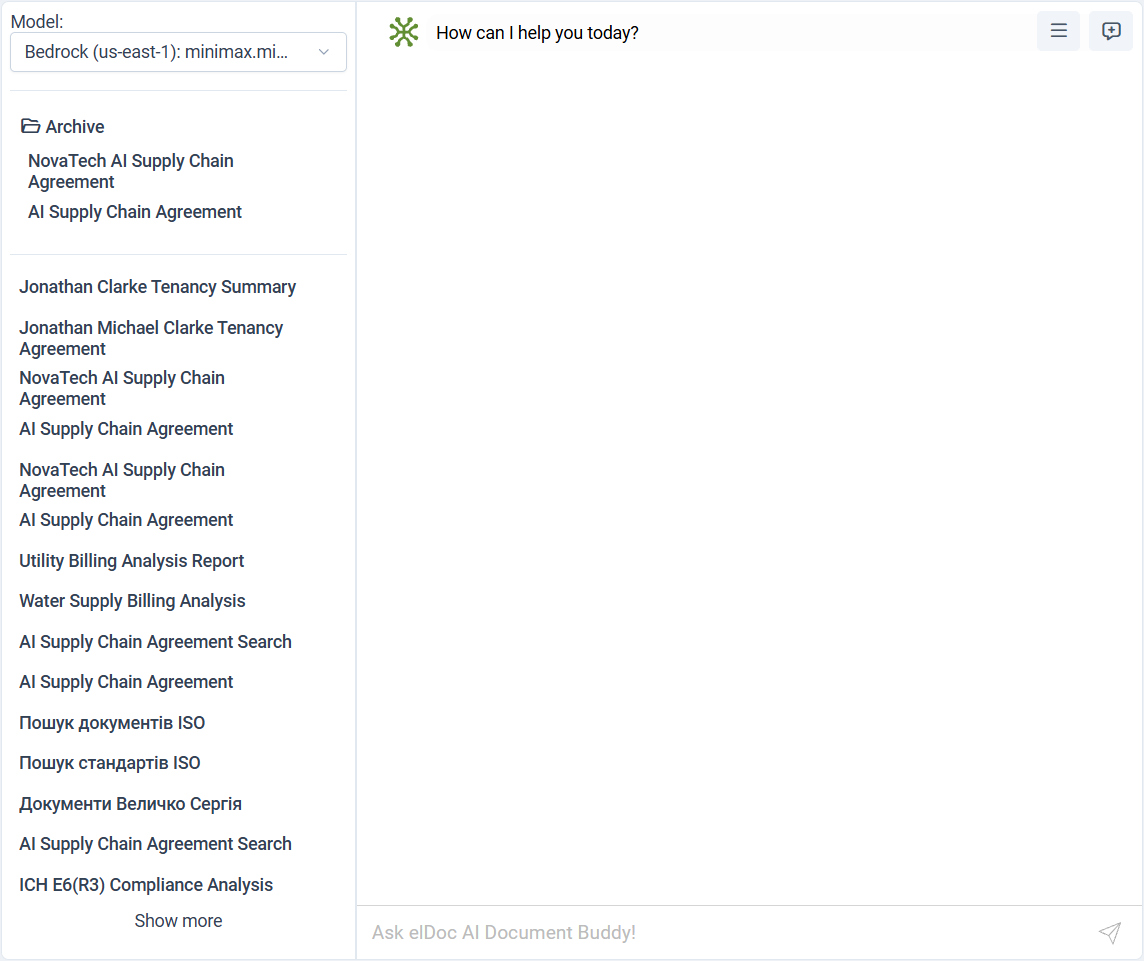
Selecting an AI Model
The Model selector at the top of the AI Chat panel allows the user to choose which configured AI model is used for the conversation.
The list contains models made available by the system administrator through the elDoc AI/LLM configuration.
Different models can provide different capabilities, performance characteristics, or provider-specific behavior.
The selected model is used for the current chat according to the capabilities enabled for that model.
Starting a New Chat
Users can start a new AI Chat conversation at any time.
A new chat creates a separate conversation context, allowing the user to begin a new topic without mixing it with previous requests and responses.
This is useful when:
starting work on a different subject;
switching to another group of documents;
beginning a separate analysis;
changing the purpose of the conversation.
Previous Chats
The AI Chat sidebar displays previously created conversations.
Users can select an existing chat to reopen it and continue the conversation with its previous context.
Chat names provide a convenient way to identify earlier conversations, for example:
document analysis;
agreement comparison;
utility billing analysis;
compliance review;
document search;
other business or document-related tasks.
Selecting an existing chat loads the corresponding conversation so the user can continue working from where the previous session ended.
Chat Archive
Older conversations can be moved to the Archive.
Archived chats remain available for later access without appearing together with the main list of active conversations.
The Archive is useful for keeping the main chat list focused on current work while preserving previous AI interactions for future reference.
Viewing More Chats
The AI Chat sidebar initially displays a limited number of conversations.
Use Show more to display additional chats when more history is available.
The same approach can be used for archived conversations where applicable.
Continuing a Previous Conversation
When a previous chat is selected, elDoc restores the corresponding conversation history and context.
The user can then continue using standard natural-language requests.
For example, after reopening a document comparison chat, the user can continue with a request such as:
Compare the same documents again, but focus only on payment terms.
or:
Create a summary of the differences we identified earlier.
This makes longer document-analysis and research tasks easier to continue across multiple working sessions.
Chat Context
Each chat maintains its own conversational context.
This means different chats can be used for different tasks without mixing their conversation histories.
For example:
Chat 1
Supply Chain Agreement Analysis

Chat 2
Utility Billing Analysis

Chat 3
Compliance Review

Chat 4
Document Search
Keeping tasks in separate chats makes previous work easier to locate and helps preserve the relevant context for each conversation.
Using AI Chat with Documents
AI Chat can be used together with files and folders available in elDoc.
Depending on the current context and available AI functionality, users can ask elDoc to:
read and understand documents;
summarize content;
compare files;
search for relevant information;
use RAG and Agentic RAG over accessible documents;
invoke AI Agents for document-related actions;
extract structured information;
work with document and image content.
Access to document information through AI Chat remains subject to the user's File Management permissions.
AI Chat and AI Agents
AI Agents can be invoked directly through the same AI Chat interface using standard natural language.
Users do not need to manually select a specific Agent.
For example:
Rename these files based on their content.
Sort these documents into folders by type and year.
Compare these agreements and show the main differences.
Extract the data from these product images and add it to this spreadsheet.
elDoc interprets the request and uses the appropriate AI Agent capabilities and tools when required.
Model Availability
The models displayed in the Model selector depend on the AI models configured and enabled by the system administrator.
A model can support additional capabilities such as:
tool usage;
Vision-Language processing;
other supported AI functions.
For information about configuring available models, see:
Admin Guide → AI/LLM Configuration → AI Model Integration
Security and Permissions
AI Chat operates within the existing elDoc security model.
When AI Chat retrieves or processes document information, the current user's permissions are enforced.
A user can only use document content through AI Chat when that user has the required access rights to the underlying files.
The same security model applies to:
semantic retrieval;
RAG;
Agentic RAG;
AI Agents;
document analysis.
Summary
AI Chat management allows users to:
select the AI model used for a conversation;
start new chats;
reopen and continue previous conversations;
maintain separate context for different tasks;
archive older chats;
access additional chat history;
use AI Chat together with documents, RAG, and AI Agents.
This allows AI-assisted work in elDoc to be organized as persistent conversations rather than isolated one-time requests.
Last modified: August 27, 2026