eSignature Copy Recipient
The eSignature Copy Recipient is a recipient who has been assigned the To receive a copy action within an elDoc eSignature package.
A Copy Recipient does not participate in the signing or review process. Instead, the recipient automatically receives the completed eSignature package after all required signing and viewing actions have been completed.
This role is useful when a finalized copy of the signed documents must be distributed to additional participants, departments, customers, legal representatives, auditors, or other interested parties.
Receiving the Completed Package
When the eSignature package is completed, elDoc automatically sends an email notification to each configured Copy Recipient.
The email confirms that the signing process has been completed and includes the final eSignature package content as attachments.
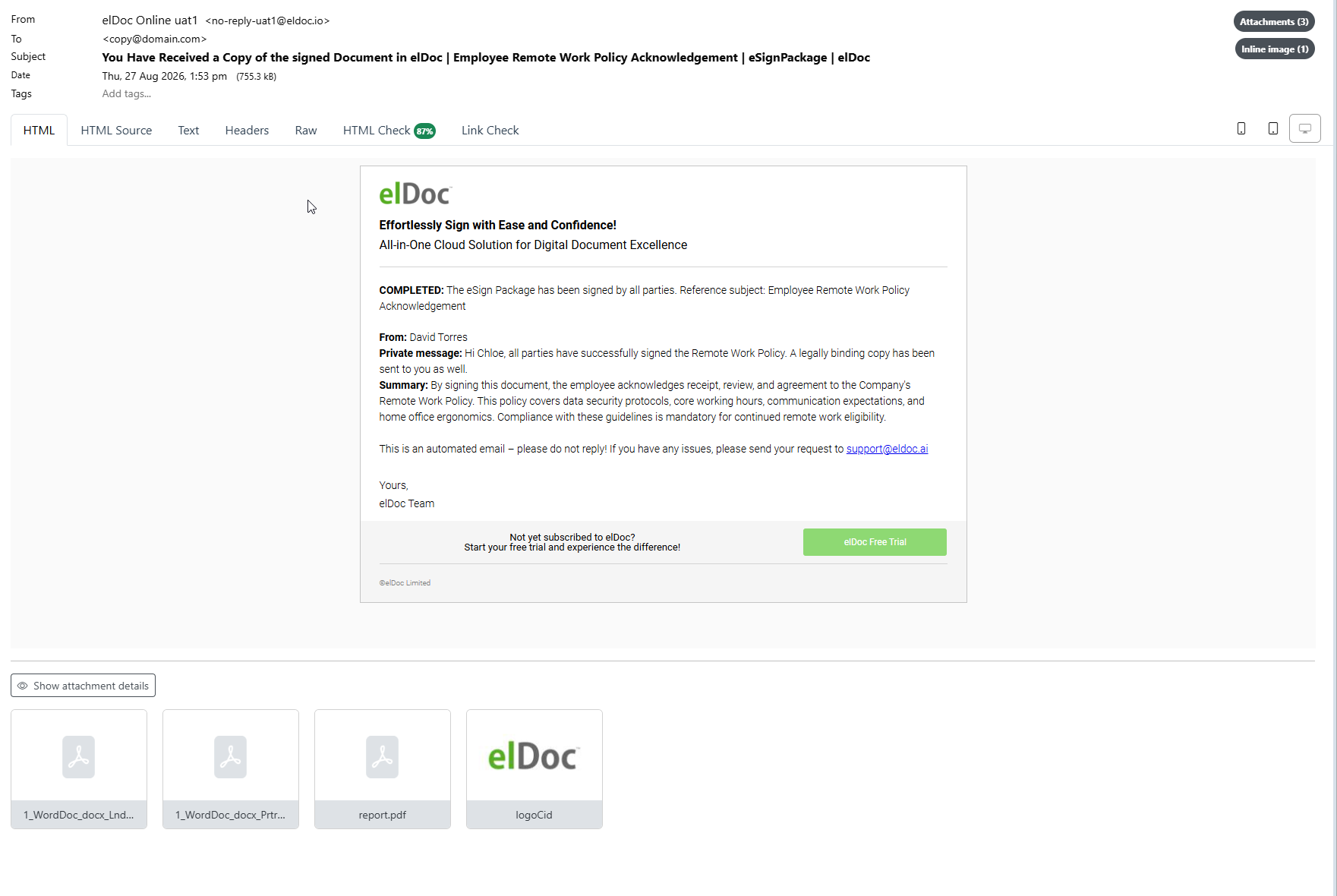
The notification can include information such as:
package subject;
Initiator;
recipient-specific private message;
package summary;
confirmation that the package has been completed;
completed signed documents;
eSignature report;
other generated package files where applicable.
No Action Is Required
Unlike a Signer or Viewer, a Copy Recipient does not need to access elDoc to complete an assigned action.
The recipient does not need to:
provide a signature;
enter initials;
complete document fields;
review the package before completion;
acknowledge receipt;
perform any other action within the eSignature workflow.
The Copy Recipient receives the final documents only after the required participants have completed their respective actions.
Email Notification
The completion email informs the Copy Recipient that the eSignature package has been signed and completed.
It can contain:
the From information identifying the Initiator;
the recipient-specific Private message;
the general package Summary;
confirmation that all required signing actions have been completed.
For example, an Initiator can provide a private message such as:
All parties have successfully signed the document. A completed copy has been sent to you for your records.
This makes it possible to provide context specific to the Copy Recipient without affecting messages sent to Signers or Viewers.
Attached Signed Documents
Completed signed documents are attached directly to the notification email.
Where the original package contains multiple documents, multiple completed files can be included.
The resulting signed PDF documents contain the final visible signing information and the certificate-based digital signatures applied by elDoc.
These documents can therefore be retained, archived, forwarded, or independently validated using standard PDF signature-validation tools.
eSignature Report
The completion email can also include the eSignature Report as an attachment.
The report provides information about the completed signing process and can include:
package identifier;
subject;
Initiator;
number of files;
number of pages;
number of signatures;
recipient information;
authentication methods;
viewed timestamps;
signed timestamps;
signature identifiers;
Viewer activity;
Copy Recipient information;
other package-related audit information.
The report complements the signed documents by providing a consolidated record of the eSignature transaction.
Example Package Received by a Copy Recipient
A completed email package can contain:
Completed signed document 1.pdf
Completed signed document 2.pdf
report.pdf
The exact number and type of attachments depend on the documents contained in the original eSignature package and the configured signing process.
Copy Recipient Workflow
A typical Copy Recipient workflow is:
Initiator Creates Package
    ↓
Signer(s) Complete Signing
    ↓
Viewer(s) Complete Review
    ↓
eSignature Package Completed
    ↓
elDoc Generates Final Signed Documents
    ↓
Copy Recipient Receives Email
    ↓
Signed Documents + Report Attached
The Copy Recipient therefore participates only at the final distribution stage of the eSignature process.
Security and Document Integrity
Documents delivered to a Copy Recipient are the completed output of the elDoc eSignature process.
The resulting signed PDFs contain certificate-based digital signatures that provide cryptographic integrity protection.
A standard PDF signature-validation application can verify whether:
the digital signature is valid;
the signing certificate is valid and trusted according to the verifier's trust configuration;
the document has been modified after signing.
The Copy Recipient therefore receives not only a visual representation of the signed document, but the resulting digitally signed PDF produced by the completed eSignature process.
Copy Recipient vs. Other Recipient Types
The different eSignature recipient roles have distinct responsibilities:
| Recipient role | Required action |
|---|---|
| Signer | Reviews and electronically signs the document |
| Viewer | Reviews the document without signing |
| Copy Recipient | Receives the completed signed package after the required actions are finished |
A Copy Recipient does not delay package completion because no interactive action is required from that recipient.
Typical Use Cases
Copy Recipients are useful when completed signed documents must automatically be distributed to parties such as:
legal departments;
HR departments;
records-management teams;
auditors;
project managers;
customers;
suppliers;
external advisors;
other stakeholders who require the final signed document but do not participate in signing.
This eliminates the need for the Initiator to manually redistribute completed documents after the signing process.
Summary
The eSignature Copy Recipient receives the final completed package automatically after the required eSignature actions are finished.
The Copy Recipient:
does not need to sign or review the package;
receives an automatic completion notification;
receives completed signed documents by email;
can receive the eSignature Report together with the signed documents;
receives recipient-specific contextual information defined by the Initiator;
obtains certificate-based digitally signed PDF documents suitable for retention and independent signature validation.
This provides a simple and automated way to distribute final signed documents to all parties who require a completed copy without adding unnecessary steps to the eSignature workflow.
Last modified: August 27, 2026