Interface language
elDoc supports a multilingual user interface. The set of available interface languages is configured by the system administrator.
When a user opens elDoc, the system uses the language selected for the current session. If no language has been selected explicitly, elDoc can use the language defined by the user's browser settings when the corresponding language is enabled in the system.
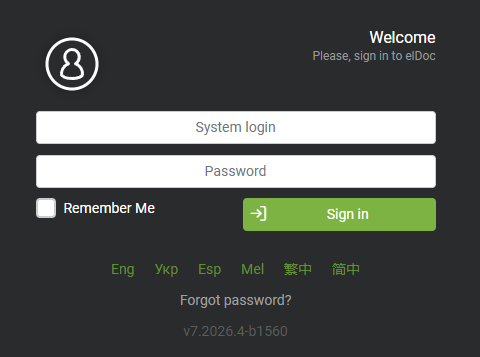
Selecting Language on the Login Page
The interface language can be selected directly from the login page before signing in.
Available languages are displayed at the bottom of the login form using language abbreviations.
Selecting a language updates the login page and starts the session using the selected interface language.
The exact list of available languages depends on the languages enabled in the elDoc system configuration.
Changing Language After Login
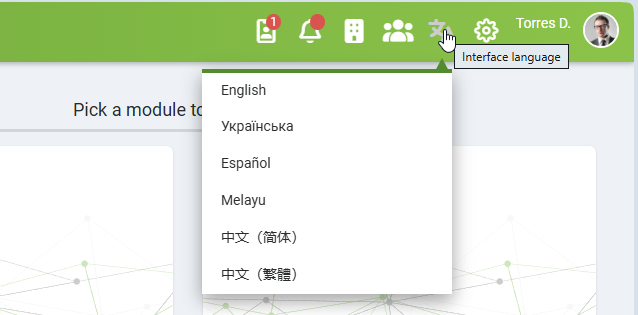
After signing in, users can change the interface language at any time using the Interface language menu in the top application bar.
The menu displays all languages currently enabled in the system.
Selecting a language reloads the user interface and applies the selected language across the elDoc application.
Multilingual Interface
The selected interface language applies to system elements such as:
menus;
page titles;
buttons and actions;
dialog windows;
system messages;
field labels;
navigation elements.
Where multilingual business data is configured, elDoc can also display localized names according to the selected interface language.
For example, Document Indexing Fields can contain different names for each enabled UI language while referring to the same underlying Indexing Field.
Important: Unsaved Data
Changing the interface language causes the current browser page to reload.
Any unsaved changes on the current page are lost.
Users should save their work before switching the interface language.
If a document is open in Edit mode when the interface language is changed, the page reload causes the document to reopen in Read mode. The user can return to Edit mode afterward if the corresponding permissions and editing functionality are available.
Available Languages
The languages available to an individual user depend on the system configuration.
For example, an elDoc installation can provide interface languages such as:
English;
Ukrainian;
Spanish;
Malay;
Simplified Chinese;
Traditional Chinese.
Additional interface languages are added continuously as the platform evolves.
Only languages enabled by the system administrator are shown on the login page and in the Interface language menu.
Last modified: August 25, 2026